Default vs. Active Hurrtrak Online Database
In 2008 we changed the way Hurrtrak Online updates current storm databases.
Prior to 2008 Hurrtrak Online would always update the current default database. This caused problems because many times users while reviewing storm from prior years (databases) would have current data automatically loaded into the prior database. i.e. if is is 2008 and a user was reviewing storms from 2005 and therefore had the 2005 database set as the default database, 2008 data would be loaded into the 2005 database.
To avoid this situation, as well as a few others, in 2008 we now have 2 database variables defined.
- Default Storm Database: This is the database that the system will open when using the Hurricane Tracking modules of the system.. This also includes the QuickPlot program. This option is set via the FILE menu option of Hurrtrak or in the System Setup portion of the system.
- Active Hurrtrak Online Database: This is the database that Hurrtrak Online will update with current data or past storm year's data you may manually select from the Hurrtrak Online Tab. This option is set in the Hurrtrak Online options.
The value of these field will allow for several situations
1. When the default and Hurrtrak Online databases match the system will not notify the user. This is considered the "normal" operating mode.
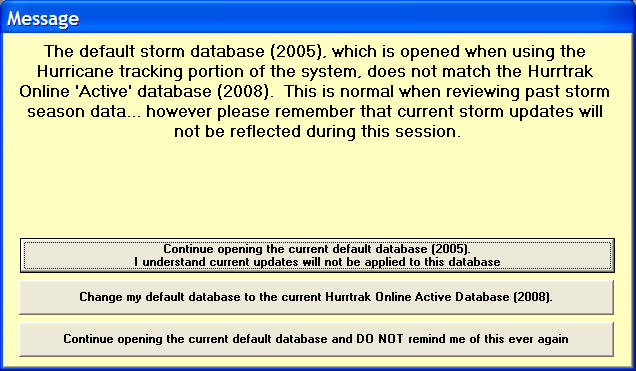
2. When the default and Hurrtrak Online databases do not match the system will present the user with an opening message informing them of this situation and providing options to continue, change the default database or disable this warning message forever in the future. We do not recommend disabling the message unless you are an expert user. Be aware that if you choose to continue in this condition, any storm data coming in from Hurrtrak Online will not be reflected during the session. This includes the notices that indicate new storm data has arrived for a storm.
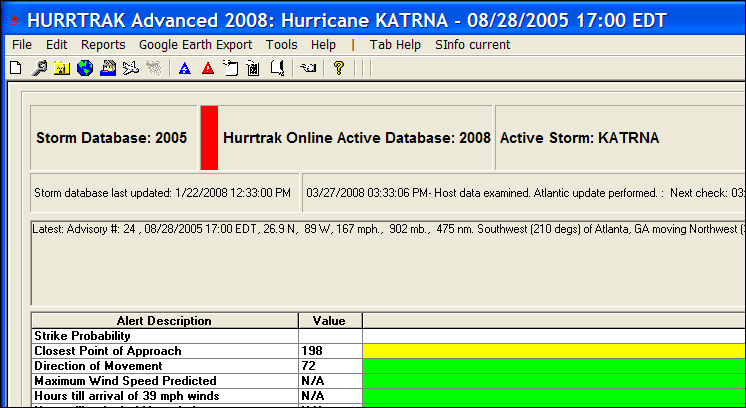
In addition, if you continue, the main database tab will show a red "flag" next to the Hurrtrak Online database name field. This serves as a reminder.
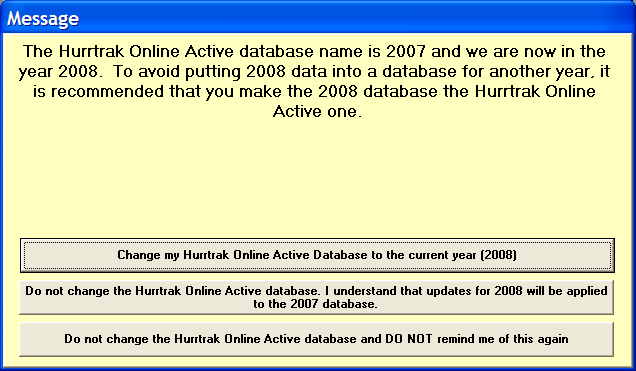
3. Finally, if the Active Hurrtrak Online Database is not in the current year.. The system will warn the user when opening the main tracking program of this condition and provide the option of changing the Active database to the current year. This should reduce the chances that data from one year will be stored into the wrong database.