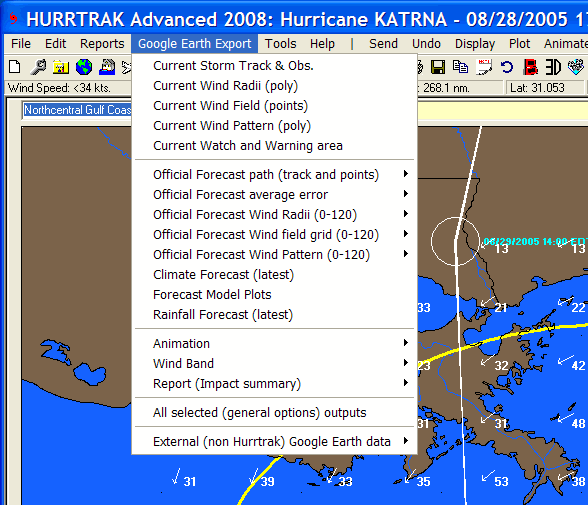
GOOGLE EARTH EXPORT
GOOGLE EARTH MUST BE INSTALLED ON YOUR PC BEFORE USING THIS OPTION !
The
Google Earth export menu option exports KML to Google Earth (GE) and is available
whenever there is an open storm. The data
that is available for export is dependent on how current the storm forecast and other
data is… but most of the export options are typically available.
These options include:
Current
Storm Track and Observations
– This option exports the storm track and observations as KML for Google Earth
(GE).
Current
Wind Radii –
When selecting this option, the system will export KML which contains up to 3 polygons
representing the current 34, 50 and 64 knot wind areas.
Current
Wind Field –
This option will export a “grid” of points across the entire current wind
field. When viewed on GE, it shows up as point
values or points which can then be interrogated (clicked on).
This is controlled by the Hurrtrak User Preferences – General Options.
Current Wind Pattern – This option export up to 10 polygons representing different wind levels of a storm. The levels are is determined via the Wind Pattern Levels tab of the Plotting User Options. Advanced Wind Estimation (AWE) is not used in this export regardless of the AWE settings elsewhere. This is because AWE wind calculations would invalidate the concept of a polygon.
Current
Watch and Warning areas
– As the same suggests, this option exports the current NHC watches and warnings.
Official
Forecast Path (track and points)
– Similar to the first option, this exports the storm’s forecast track
and the forecast points. The user can select
to export the current or any prior forecast tracks.
Official
Forecast Average Error
– This option will export an area which represents the forecast’s average
error. The user can select to export the current
or any prior forecast average error. This
may take a few seconds to run.
Official
Forecast Wind Radii
– When selected, the system will export KML which contains up to 3 polygons
representing the forecast 34, 50 and 64 knot wind areas… for a specific hour
in the forecast.
Official
Forecast Wind Field
– This option will export a “grid” of points across the entire forecast
wind field… at a specific forecast hour. When
viewed on GE, it shows up as point values or points which then can be interrogated.
Official Forecast Wind Pattern – This option export up to 10 polygons representing different wind levels of a storm for a specific forecast hour. The levels are is determined via the Wind Pattern Levels tab of the Plotting User Options. Advanced Wind Estimation (AWE) is not used in this export regardless of the AWE settings elsewhere. This is because AWE wind calculations would invalidate the concept of a polygon.
Climate
Forecast –When
selecting this option, the latest climate forecast will be exported and shown on
GE.
Rainfall
Forecast – This
option will exports 3 sets of KML files which represent the forecast rainfall for
the next 3 days. They are shown as unfilled
polygons.
Animation
– This is a powerful option which allows the user to export the entire past
or forecast wind radii and view it using GE’s animation capability.
The latest version of GE is required to support this capability.
Wind
Bands – This
option allows the user to export the past or forecast wind bands to a 3D KML file
for viewing on GE. The creating of this export
may take a few minutes depending on the number of levels defined for export.
This is controlled in the Hurrtrak User Preferences – General Options.
Report
(impact summary) –
This is another powerful feature whereby you can export all of the data in a location,
county or zip code summary report to a point type KML file.
When viewed on Google Earth, all of the summary data information is shown
with a simple click on that location’s point icon.
All
Selected Outputs –
This is a real time saving feature. It allows
the user to create any/all of the outputs with a single selection.
The data that is included with this “batch” export is controlled
within the Hurrtrak User Preferences – General Options.
Depending on what is included, this option may take a few minutes to complete.
External
(non Hurrtrak) Google Earth Data - This option allows the user to export National
Weather Service and other weather data onto Google Earth. When hurricane information
is also exported from the Hurrtrak system, it allows the user to integrate the 2
sources of data on the same Google Earth interface. See Using
Google Earth External Data for more information.
See
Google
Earth Interface and Using
Google Earth External Data for more information on this topic.