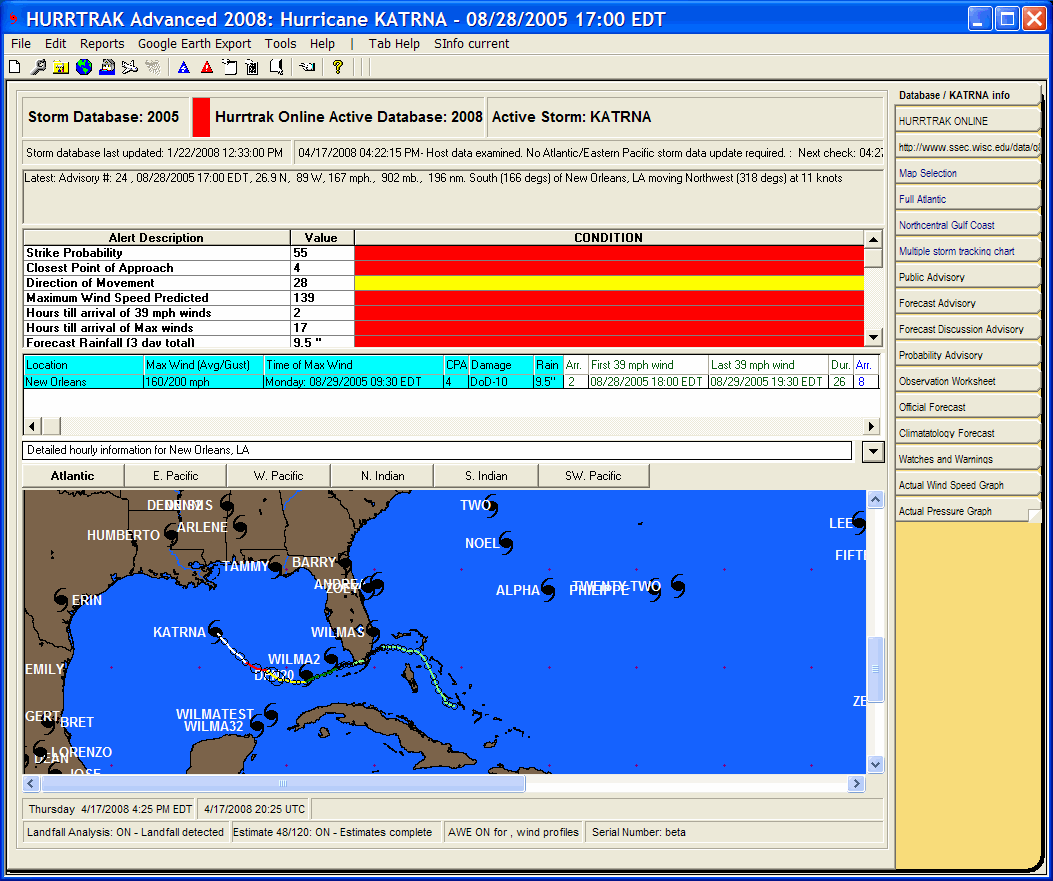
This status bar indicates the Active Hurrtrak Online Database. All current/operational database updates are applied to this database, not necessarily the open database. Under operational conditions this database should match the default open database. A RED bar is displayed next to the storm name when the default and Hurrtrak Online databases do not match.
This status bar indicates the open storm database. Operational database updates are applied to the Hurrtrak Online Active Database... not this one (unless they match).
This status bar indicates the current storm name
This status bar indicates the date/time that the current database was last updated.
This status bar indicates the last date/time HURRTRAK ONLINE was accessed along with the action taken.
This status bar indicates the current storm's parameters and its relative position to a base location, if defined
If a base location has been defined, this status bar area indicates the current storm's forecast impact to that location.
If a base location has been defined, this status area indicates the current storms forecast hourly impact to that location. Select the down arrow dropdown on the right of this area to see all of the hourly data.
This area shows all of the storms in the current database via black and red hurricane icons. Black icons represent older storms (>48 hours) while red icons represent current storms. In addition, the actual track of the current loaded storm is shown. DOUBLE CLICKING on a storm icon will load that storm and make it current. Finally, Global users have the option of changing storm basins by selecting the command button.
This status bar indicate the current time in local and UTC as well as any tide information for the base location and the product's serial number. In order to see tide information the base location has to be defined in the general options and a tide station associated to a base location (location maintenance in system setup).
This status bar indicates any "special" conditions such as the system using post storm analysis, forecast estimation, landfall analysis, "What if " analysis, Advanced Wind Estimation, etc..
General Tab Information
Point and click on the different areas of the General Information Tab as shown above for a description of what each represents.