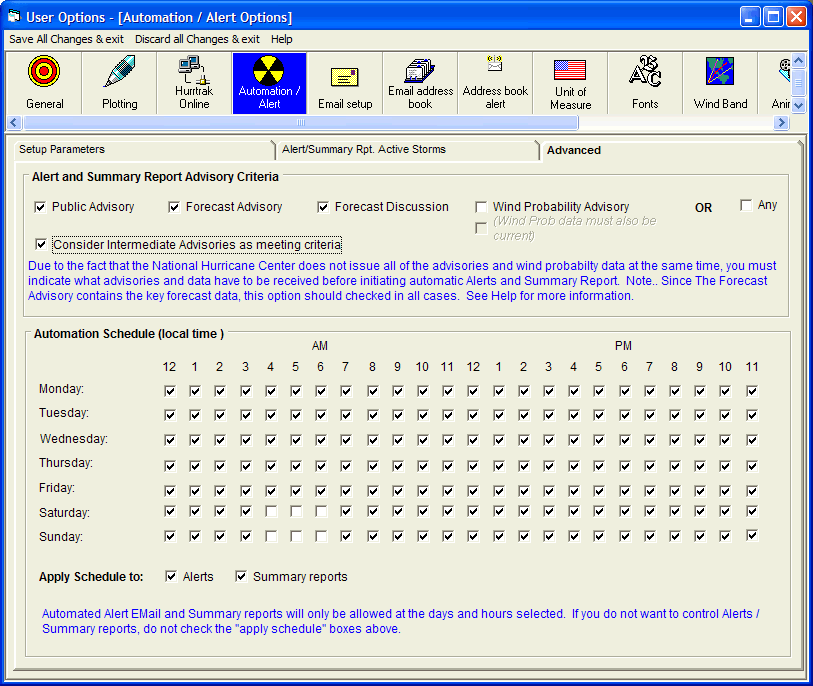
This data allows the user to define what criteria the system should use to initiate Automated Alert and Summary Reports. We recommend the minimal selection be the Public Advisory, the Forecast Advisory, and the Intermediate Public Advisory. These advisories contain the critical current and forecast information. Be aware that selecting all of the advisories may result in a delay of any automated processing as the system waits for all of the advisories to become available. Selection of "ANY" on the other hand would cause the initiation of automatic process every time any type of new advisory becomes available. This is not recommended as multiple Alerts and Summary reports would be generated for each advisory package. A special note about Wind Probability data… While the Wind Probability Advisory data comes in as part of the NHC advisory package with the other text advisories, the Wind Probability data can be issued at a later time. The timing of this data is uncertain at this time and may lag the advisory text data 30-45 minutes. Due to this, we suggest you do not select the Wind Probability Data option until this becomes better established.
These checkboxes control the schedule at which the defined alerts and summary reports will automatically be sent. This allows the user to prevent reports from being sent at undesired times while allowing alerts and reports to be sent at other times. When a day / time checkbox is marked it pertains to the hour following the check time.
Automation / Alert Setup
This option allows the user to maintain Automation/Alert preferences. Point and click on the options shown above for a description of what they control.