Summary Report
There
are 2 types of summary reports. The Standard report which has been in the system
for many years and a new one introduced in 2008 called the "Executive"
summary report.
STANDARD SUMMARY REPORT:
There
are 2 categories of standard summary reports. One
that is specific to a location and a 2nd type that is a generic report
about a storm.
The
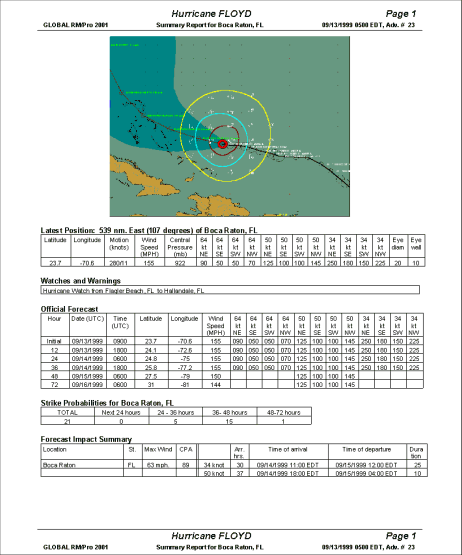
first category of summary report is designed to provide “all the critical information”
about a storm’s potential impact to a location on one easy to understand report.
The
report optionally includes a user defined graphic, user diary contents, latest storm
position information, watches / warnings, official forecast information, strike probabilities,
forecast impact summary, forecast impact detail, and NHC advisory text.
The
2nd category of Summary Report (not location based) is similar to the
location based report except that location specific sections are not included.
These sections are the strike probabilities and forecast impact summary and
detail.
You can create the summary report manually or have it automatically generated. To create it manually select Process Summary Report from the Report menu. To have the report automatically created you must follow the summary report setup process.
Example shown below:
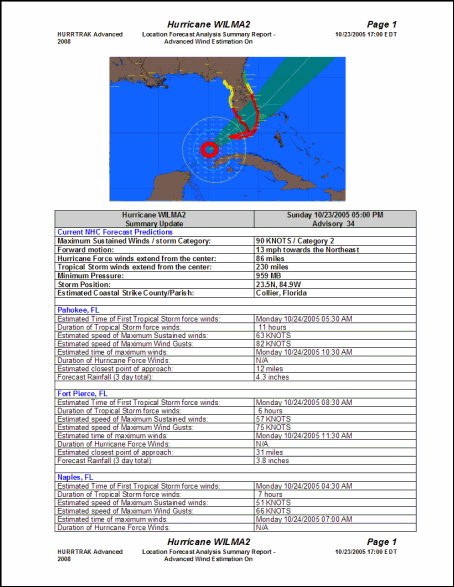
"EXECUTIVE SUMMARY REPORT:
The "executive" summary report is designed to show impact to multiple locations in a high level, less tabular looking format.
You can create the "Executive" summary report manually or have it automatically generated. To create it manually select Process Summary Report from the Report menu or select the Print/Export option from a Location Wind Profile (tab based) report. To have the report automatically created you must follow the summary report setup process.
An example of this report is shown below: