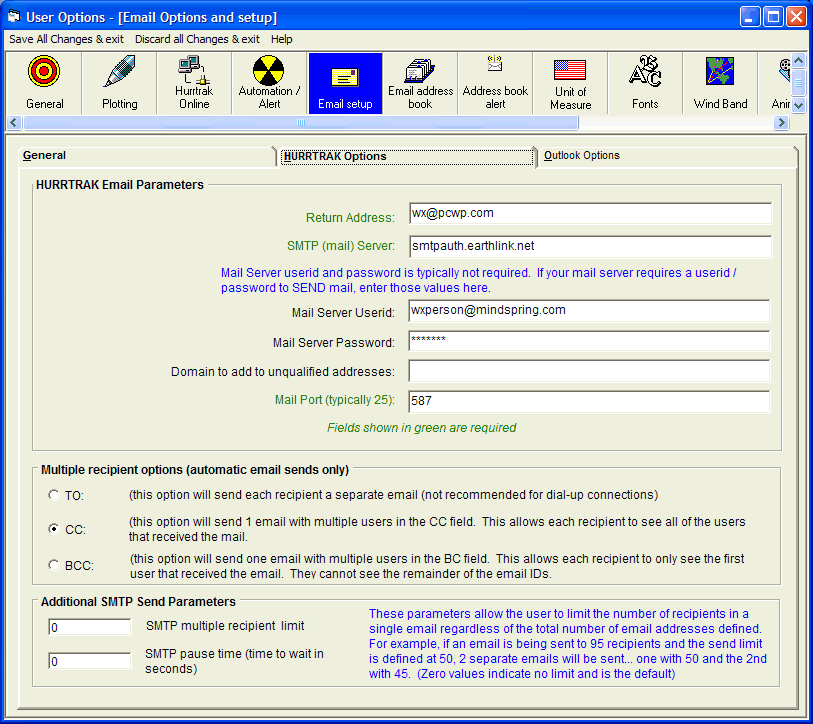
These
parameters allow the user to limit the number of recipients in a single email regardless
of the total number of email addresses defined.
For example, if an email is being sent
to 95 recipients and the send limit is defined at 50, 2 separate emails will be
sent… one with 50 and the other with 45.
The 2 parameters available are
SMTP
multiple recipient limit – max number
of recipients in a single email
SMTP
pause time – time to wait in seconds
between batches of emails.
Specifies the userid and password that your SMTP mail server needs to send mail. This is typically not required.
This is where you enter your HURRTRAK ONLINE userid and password assigned by PC Weather Products.
Specifies the mail port that your Email system uses to send mail. This is typically a value of 25.
Enter a valid return address that you would like to use when sending Email.
This is the name of the server where you send your messages to. The name of this server is SMTP (Simple Mail Transfer Protocol).
Specifies a domain to be added to unqualified names.
An unqualified name is one that doesn't have an "@" sign followed by a domain name. If you address a message to someone without including their domain name, HURRTRAK automatically adds this domain to that address. This setting can be used as a time-saving device when addressing large numbers of messages to users who reside in the same domain.
This is the name of the server where you send your messages to. The name of this server is SMTP (Simple Mail Transfer Protocol).
Email Setup
This option allows the user to setup general Email parameters. Point and click on the options shown above for a description of what they control.