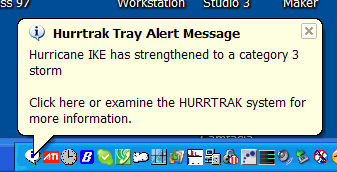
Tray Alert Messaging
We
found that Hurrtrak users, busy at their workstations, desired a way to be alerted
to new and changing conditions in the tropics. The "tray alert messaging"
(TAM) system notifies our users, via pop-up tray messages, of several noteworthy
conditions including: the formation of new storms, storm strengthening or weakening,
the issuance of watches or warnings, updated storm data, issuance of the last advisory,
new tropical weather outlooks or new tropical disturbance statements.
This
module will initialize when Windows is started and depends on the Hurrtrak Online
Timer program also running in the System Tray.
The
options for this tray program (right click on the “I” bubble icon in tray)
are:
Redisplay
last message.
If you miss a message it will redisplay the last message displayed by the
system.
Display
Tray Alert Log – This option displays,
in a concise manner, all of the messages displayed since the last restart of your
system along with the date/time they were displayed.
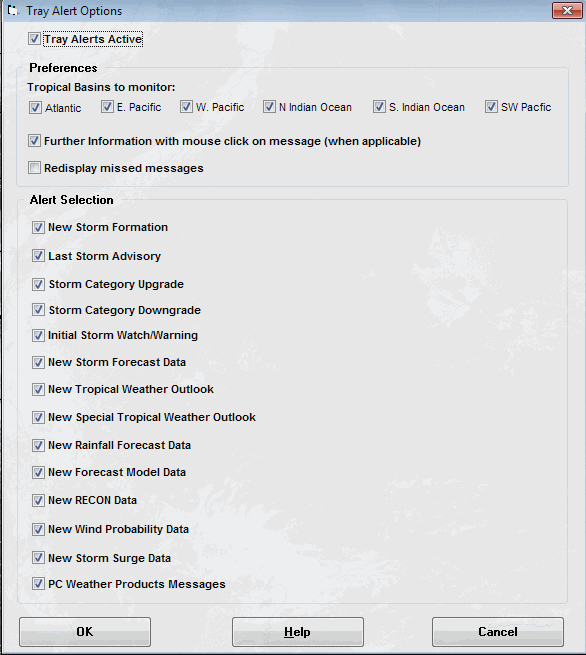
Options
– This option presents the user with
the following window, allowing them to change which conditions they should be alerted
to and how to handle those conditions.
Selections
on this window include:
Tray
Alert Active – This option will activate
or de-activate the Tray Alert Function.
Tropical
Basins to monitor – For Global or Advanced
users this option allows the user to see messages only for tropical areas they are
interested in.
Further
Information with mouse click on message –
This option allows a “helper” program to open when the message is clicked upon via
the mouse. For example, if a new tropical
weather outlook message is displayed, the Tropical Weather Outlook will display when
the message is clicked.
Redisplay
missed messages – This option will redisplay
the message every 5 minutes unless it has been “clicked” on.
This assures you will not miss any messages since the Windows operating system
will often hide tray messages when there is other activity on the PC system.
Alert
Selection – In this section you specify
which alert you would like to see displayed. Uncheck
any you do not want to see. When there is
an active reconnaissance flight, the New RECON Data option will result in many tray
messages.
Exit
– This option closes the program.
No more messages will be displayed.