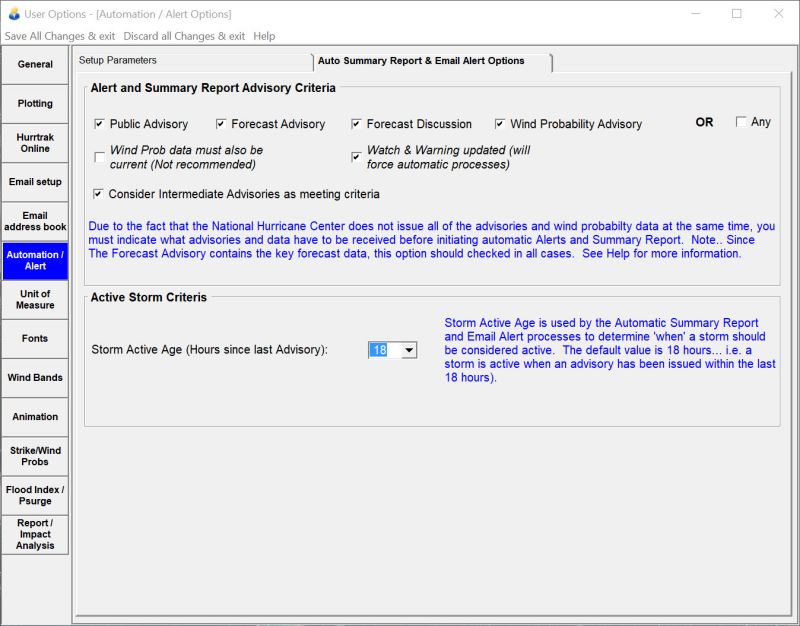
This data allows the user to define what criteria the system should use to initiate Automated Alert and Summary Reports. We recommend the minimal selection be the Public Advisory, the Forecast Advisory, and the Intermediate Public Advisory. These advisories contain the critical current and forecast information. Be aware that selecting all of the advisories may result in a delay of any automated processing as the system waits for all of the advisories to become available. Selection of "ANY" on the other hand would cause the initiation of automatic process every time any type of new advisory becomes available. This is not recommended as multiple Alerts and Summary reports would be generated for each advisory package.
A new option in 2021 is the Watch and Warning option. If checked it will force initiation of automatic processes whenever new watch/warning data comes in. This typically occurs after all of the advisories are in.
A special note about Wind Probability data… While the Wind Probability Advisory data comes in as part of the NHC advisory package with the other text advisories, the Wind Probability data can be issued at a later time. The timing of this data may lag the advisory text data. Due to this, we suggest you do not select the Wind Probability Data option until this becomes better established.
Storm Active Age is used by the Automatic Summary Report, E-MAIL Alert, and Automations processes to determine when a storm should be considered active. The default value is 18 hours... i.e. a storm is active when an advisory has been issued within the last 18 hours. This value is really only meaningful when running the "automatic" processes manually since a storm is obviously active if the system creates these reports when new data is received on a storm.
Automation / Alert Setup
This option allows the user to maintain Automation/Alert preferences. Point and click on the options shown above for a description of what they control.