When Attach Tracking Chart is ON, the Email recipient will receive a tracking chart centered on the storm... attached to the Alert Message. This image is automatically generated by the system and cannot be "controlled" by the user. To send images that can be determined by the user, use the summary report option. The EmailAlert location group is used to plot locations on the map generated for the EMail Alert.
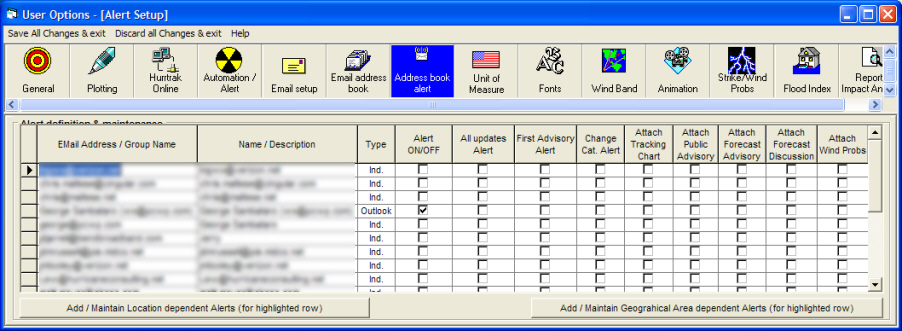
These fields show the Email addresses that have been defined on the system and are available for alert definition. To maintain the Addressbook (Email list), go to EMail Addressbook options.
The Addressbook entries overall Alert switch. When this indicator is ON then all alerts defined for this user are active. When it is OFF, none of the alerts defined are active.
When this option is ON, the Email recipient will receive an Email whenever new data arrives. The Email consist of a short message indicating the alert and optional advisory data. This options will send a lot of Email so please use it carefully.
When First Advisory Alert is ON, the Email recipient will receive an Email when the first advisory is issued for a tropical depression or when a tropical depression becomes a named storm. The Email consist of a short message indicating the alert and optional advisory data.
When Change Cat. Alert is ON, the Email recipient will receive an Email whenever a storm's Category changes (either up or down). The Email consist of a short message indicating the alert and optional advisory data.
When Attach Public Advisory is ON, the Email recipient will have the NHC Public Advisory attached to any Alert Message.
When Attach Forecast Advisory is ON, the Email recipient will have the NHC Forecast Advisory attached to any Alert Message.
When Attach Forecast Discussion is ON, the Email recipient will have the NHC Forecast Discussion attached to any Alert Message.
When Attach Wind Prob is ON, the Email recipient will have the NHC Issued Wind Probabilities attached to any Alert Message.
Address book Alert
This option allows the user to define/maintain E-mail Addressbook Alerts. See Email Alert Process for more information on this topic.
Point and click on the options shown above for a description of what they control.